Avast antivirus: an independent guide to features, plans and privacy
This article contains partner (affiliate) links to Avast, marked “Partner link”. If you buy after clicking one, CTTSTAV s.r.o., the publisher of this site, earns a commission from the advertiser. The price you pay is the same. Avast did not write, review or approve this article, and verantis.online is not affiliated with, endorsed by or sponsored by Avast or Gen Digital Inc. Read our editorial policy.
What security software actually does, what Avast offers, what independent labs and regulators have said about it, and the questions worth asking before you pay for any antivirus plan.
At a glance
Points in its favour
- A long-established vendor: the company behind Avast was founded in Prague in 1988.
- A free antivirus tier exists alongside paid plans, so you can try the core protection first.
- Avast products are regularly included in tests by independent labs such as AV-TEST and AV-Comparatives, whose reports are public.
- Paid plans bundle extra tools; some plans include a VPN.
Points to weigh
- A documented privacy history: in 2024 the US FTC and the Czech data protection authority both acted over the sale of users’ browsing data through its former subsidiary Jumpshot.
- Features differ a lot between plans and platforms; not every plan includes a VPN.
- Introductory prices typically renew at a higher rate; check before you buy.
- Windows already includes Microsoft Defender, which may be enough for some users.
Why security software still matters
Most of us bank, shop, work and keep in touch online, and every one of those activities is a target. The European Union Agency for Cybersecurity (ENISA) publishes an annual Threat Landscape report; recent editions consistently list ransomware, malware, social engineering such as phishing, and threats against data among the main risks. These threats are not reserved for large companies: ordinary households and small businesses are hit too, often through a single convincing email or a malicious download.
Security software is one layer of defence, not a guarantee. It works best alongside habits that cost nothing: installing updates promptly, using unique passwords with a password manager, turning on two-factor authentication and keeping backups. Our online security checklist covers those basics.
How antivirus software works
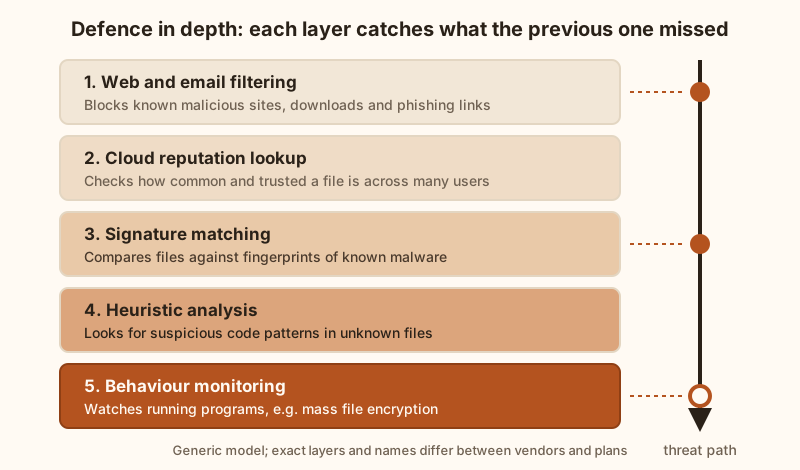
The word “antivirus” dates from a time when products mainly compared files against a list of known malicious code. Modern products, from Avast and its competitors alike, combine several techniques:
- Signature matching — comparing files with fingerprints of malware that has already been identified. It is fast and reliable for known threats but cannot, on its own, catch brand-new ones.
- Heuristic analysis — examining unknown files for code patterns or structures typical of malware.
- Behaviour monitoring — watching what programs do once they run. A program that suddenly starts encrypting hundreds of documents behaves like ransomware, whatever its file looks like.
- Cloud reputation — checking a file or website against data the vendor gathers from its user base, so that something seen for the first time can be treated with more suspicion than a widely used, signed application.
- Web and email filtering — blocking known phishing pages, malicious downloads and dangerous attachments before they reach you.
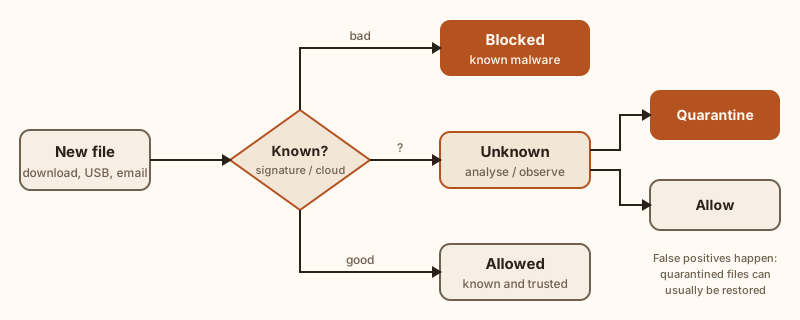
No combination of these techniques is perfect. Products occasionally miss a threat, and occasionally flag a legitimate file as dangerous (a “false positive”). That is why good products quarantine suspicious files rather than deleting them outright, so that you can restore a file if the verdict was wrong.
Who makes Avast
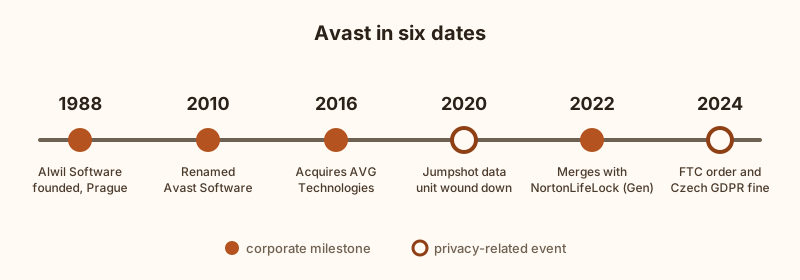
Avast began in 1988 in Prague, then in Czechoslovakia, when Pavel Baudiš and Eduard Kučera set up a cooperative called Alwil Software. The company took the name of its best-known product and became Avast Software in 2010. In 2016 it acquired AVG Technologies, another large consumer antivirus brand.
In September 2022 NortonLifeLock completed its merger with Avast, and in November 2022 the combined company renamed itself Gen Digital Inc. Gen’s brands include Norton, Avast, AVG, Avira and LifeLock, and the group has headquarters in Tempe, Arizona, and Prague. In practice this means Avast is now one brand within a larger group, rather than an independent company.
Avast’s products and plans
Avast sells, or has sold, several consumer products, and the line-up changes over time. At the time of our research, the main options were broadly as follows. Treat this as orientation only and check the current plan page before you decide, because names, contents, device limits and prices change.
| Product | What it is, in general terms | Things to check |
|---|---|---|
| Avast Free Antivirus | Core malware protection at no charge. | Which features are limited or offered as paid upgrades; prompts to upgrade. |
| Avast Premium Security | Paid antivirus with additional protection features. | Independent reviewers have noted it does not include the VPN; check before buying if you need one. |
| Avast One | An all-in-one app with free and paid tiers, combining security, privacy and device-tidying tools. | Whether the VPN in your chosen tier has limits; how many devices are covered. |
| Avast Ultimate | A bundle that has combined Premium Security with separate apps such as SecureLine VPN, Cleanup Premium and AntiTrack. | Whether you need every app in the bundle; the renewal price. |
| Avast Secure Browser | A separate, free web browser. | It is a separate download, not a feature of the antivirus itself. |
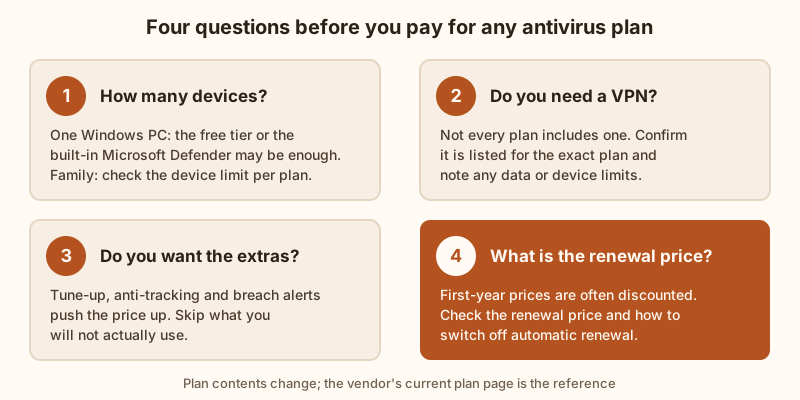
One correction to a common claim: Avast’s standalone password manager, Avast Passwords, was put on hold by the company in 2020 and new licences stopped being sold. Password-management features may appear in some newer products, but you should not assume every Avast plan includes a password manager, a VPN or parental controls. Check the feature list for the exact plan and platform (Windows, macOS, Android or iOS), because features also differ between operating systems.
What independent testing tells you
Marketing claims about “the best detection” are hard to verify, so the most useful evidence comes from independent test labs. Two of the best known are AV-TEST (Magdeburg, Germany) and AV-Comparatives (Innsbruck, Austria). Both regularly test consumer products, including Avast’s, for protection against real-world threats, for false positives and for their impact on system performance, and both publish their results.
Avast products have generally achieved good results in these tests, but results vary from one test round to the next, and many competing products also score well. Rather than relying on anyone’s summary, including ours, look at the most recent reports on the labs’ own websites and compare products tested in the same round, on the same operating system. Be wary of any claim that a product “always” tops the tests or detects “100%” of threats.
Performance and usability
Security software has a reputation for slowing computers down. Labs such as AV-Comparatives and AV-TEST measure this by timing everyday tasks, such as copying files, opening websites and installing applications, with and without the product installed. Modern products, Avast included, usually have a modest impact on a reasonably recent computer, but the effect depends on your hardware, what you are doing, and when full scans run. If performance matters to you, schedule full scans for times you are not using the computer, and check the latest performance test results.
On usability, Avast’s free products in particular have been criticised by some reviewers for frequent prompts to upgrade or to try additional products. Expect some of these, and read each screen before clicking.
Avast’s privacy record
Any honest guide to Avast has to cover this. Security software sees a great deal of what happens on your device, so how the vendor treats that data matters.
Jumpshot. Avast owned a subsidiary called Jumpshot, which sold access to data about users’ web browsing to marketers. After press investigations, Avast announced in January 2020 that it would wind Jumpshot down.
US Federal Trade Commission (2024). In February 2024 the FTC announced an order requiring Avast to pay $16.5 million and banning it from selling or licensing web browsing data for advertising purposes. The FTC charged that Avast had collected browsing information through its browser extensions and antivirus software, stored it indefinitely and sold it without adequate notice or consent, while claiming its products would protect users from online tracking. The order was finalised in June 2024, and the payment was intended for consumer redress.
Czech data protection authority (2024). In April 2024 the Czech Office for Personal Data Protection (ÚOOÚ) announced a fine of CZK 351 million (reported as roughly €13.9 million) under the GDPR. The authority found that in 2019 Avast had transferred pseudonymised browsing data relating to roughly 100 million users to Jumpshot, while users had been told the data was anonymous and used for trend analytics.
These events concern practices that Avast says it has ended, and the FTC order imposes ongoing restrictions. Whether that history matters to you is a personal judgement. Either way, read Avast’s current privacy policy, look at the data-sharing settings during installation, and switch off anything you do not want.
The built-in alternative
Windows 10 and Windows 11 include Microsoft Defender Antivirus, part of the Windows Security app, at no extra cost. It updates through Windows Update and is also tested by the labs mentioned above. When you install another antivirus product such as Avast, Defender’s real-time protection normally steps aside to avoid conflicts.
For a single Windows PC used carefully, Defender, combined with good habits, may be all you need. A third-party suite becomes more relevant if you want protection for several devices and operating systems under one account, extra tools such as a VPN, or a different interface and feature set. macOS, Android and iOS each have their own built-in protections, and the benefit of extra software varies by platform.
Who Avast may suit, and who might skip it
It may suit you if you want to try free protection before paying, you want one subscription for several devices, or you want a VPN and other tools bundled with the antivirus and have checked that your chosen plan includes them.
You might look elsewhere if the vendor’s privacy history is a deciding factor for you, you only use one Windows PC and are happy with Microsoft Defender, or you prefer software without upgrade prompts.
Installing it safely
- Download only from the official website. Fake “antivirus” downloads on third-party sites are a classic way to spread malware.
- Remove other antivirus products first. Two real-time scanners running at once can conflict. Microsoft Defender is the exception: it steps aside automatically.
- Read each installer screen. Installers may offer additional products, such as a browser or other tools. Untick anything you do not want.
- Review privacy settings. Look for options about sharing usage data or receiving offers, and set them to your preference.
- Run a first scan and check updates. Make sure the product reports that it is up to date and active.
Before you pay
- Check the renewal price. First-year prices are often discounted, and subscriptions usually renew automatically at the standard rate. Note the renewal date and how to switch automatic renewal off in your account.
- Check the refund terms. Avast advertises a money-back guarantee on many subscriptions; read the exact conditions for your country and plan on the vendor’s website.
- Know your rights. In the EU, consumers generally have a 14-day right of withdrawal for online purchases, but for digital content and services this right can be lost once supply starts with your consent. The seller must tell you before you buy.
- Buy the plan you need. Count your devices and the tools you will really use before choosing a bundle.
Frequently asked questions
Is Avast’s free antivirus enough?
For many people using one computer carefully, a free antivirus, or the protection built into their operating system, combined with updates, backups and strong passwords, provides a reasonable baseline. Paid plans add convenience and extra tools rather than a different level of certainty. No product can guarantee that you will never be affected by malware.
Does Avast include a VPN?
Some plans do and some do not. At the time of writing, independent reviewers reported that Avast One paid plans and the Ultimate bundle included a VPN, while Premium Security did not. Check the current plan page.
Is Avast the same as AVG?
Both brands have belonged to the same company since Avast acquired AVG in 2016, and both are now part of Gen Digital. They remain separate products and brands.
Is it safe to use given the Jumpshot case?
The facts are set out in the privacy section above and in the linked regulator documents. Avast states that the practices have ended, and the FTC order restricts the sale of browsing data for advertising. Decide based on those sources and on Avast’s current privacy policy.
Sources
- US Federal Trade Commission, “FTC Order Will Ban Avast from Selling Browsing Data for Advertising Purposes, Require It to Pay $16.5 Million…”, press release, February 2024: https://www.ftc.gov/news-events/news/press-releases/2024/02/ftc-order-will-ban-avast-selling-browsing-data-advertising-purposes-require-it-pay-165-million-over
- US Federal Trade Commission, “FTC Finalizes Order with Avast Banning It from Selling or Licensing Web Browsing Data for Advertising…”, press release, June 2024: https://www.ftc.gov/news-events/news/press-releases/2024/06/ftc-finalizes-order-avast-banning-it-selling-or-licensing-web-browsing-data-advertising-requiring-it
- Czech Office for Personal Data Protection (ÚOOÚ), “Czech DPA imposed fine of 351 million CZK for GDPR infringement”, 15 April 2024: https://uoou.gov.cz/en/news/business-communication/czech-dpa-imposed-fine-of-351-million-czk-for-gdpr-infringement
- Gen Digital newsroom, “NortonLifeLock Completes Merger with Avast”, 12 September 2022: https://newsroom.gendigital.com/2022-09-12-NortonLifeLock-Completes-Merger-with-Avast
- Avast blog, “A history of freedom” (company history): https://blog.avast.com/a-history-of-freedom-avast
- Avast blog, “We’re putting Avast Passwords on hold. Here’s why.”: https://blog.avast.com/avast-passwords-eol-avast
- AV-TEST, independent test results for consumer security products: https://www.av-test.org/en/
- AV-Comparatives, independent test reports: https://www.av-comparatives.org/
- ENISA, European Union Agency for Cybersecurity, Threat Landscape reports: https://www.enisa.europa.eu/
- Avast, official product and plan pages: https://www.avast.com/
Source addresses are shown as plain text so that this page makes no requests to other sites. Copy an address into your browser to open it.
About this article
Written by Linda Walker, responsible editor, and published by CTTSTAV s.r.o.. Facts were checked against the sources listed above on 24 September 2026. Product features, plans and prices change: in case of any divergence between this article and the information published by Avast, Avast’s own current information prevails. This article is general information, not personalised advice.
verantis.online is not affiliated with, endorsed by or sponsored by Avast, Gen Digital Inc. or any other company mentioned. Avast, AVG, Norton and other names are trademarks of their respective owners. All illustrations and diagrams on this page are original works created for verantis.online; none is a product screenshot or stock image.
Spotted an error? Email info@verantis.online. See our corrections procedure.
Update history: 24 September 2026 — article rewritten and expanded; unsupported claims about detection rates, bundled features and privacy practices corrected; sources added.